Public Health at the Bedside: Integrating Public Health Training in a Family Medicine Clerkship
Sean P. Haley, MD MPH; Cristin S. Adams, DO
The Institute of Medicine (IOM) has called for the integration of family medicine and public health.1 Though family medicine leaders had previously asserted this need,2 the 2012 IOM declaration came within the context of changing health funding schemes with the passage of the Patient Protection and Affordable Care Act. With this national call and funding change, an increasing number of medical schools have sought to bring public health training into their curricula.
While many family medicine clerkships (FMC) incorporate public health into their curricula, a recent CERA survey of clerkship directors demonstrated significant variation in curriculum design.3 At the Medical University of South Carolina, we developed and implemented “Public Health at the Bedside,” a program which consists of structured didactics, experiential activities, and student-led learning. Students completing their required third-year FMC work with community preceptors at various practices throughout the state. Since this clerkship provides the main opportunity for students to experience a practice setting outside of the university setting, the rotation offers an excellent chance to apply public health principles and tools at the community level.
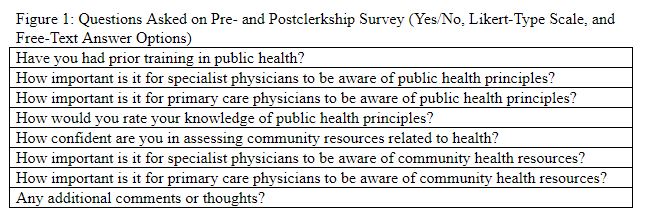
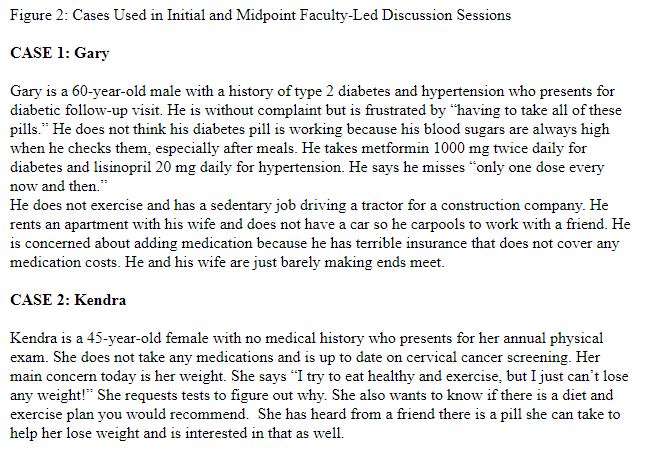
At the start of their FMC, students complete an eight-question survey regarding their background in and attitudes toward public health as well as their knowledge of community resources (Figure 1). Students then participate in a faculty-led discussion highlighting the role of family medicine in public health. During this session, students receive a case (Figure 2) of a patient with uncontrolled diabetes and limited resources. Students are charged with conducting a modified community needs assessment within the zip code of their FMC placement. Students are provided a link to the South Carolina Department of Health and Environmental Control county health profiles to look up prevalence of hypertension, diabetes, and obesity in the county of their FMC. These data are entered into a web-shared spreadsheet (Figure 3). Small groups of students then compare the findings in their geographic areas.
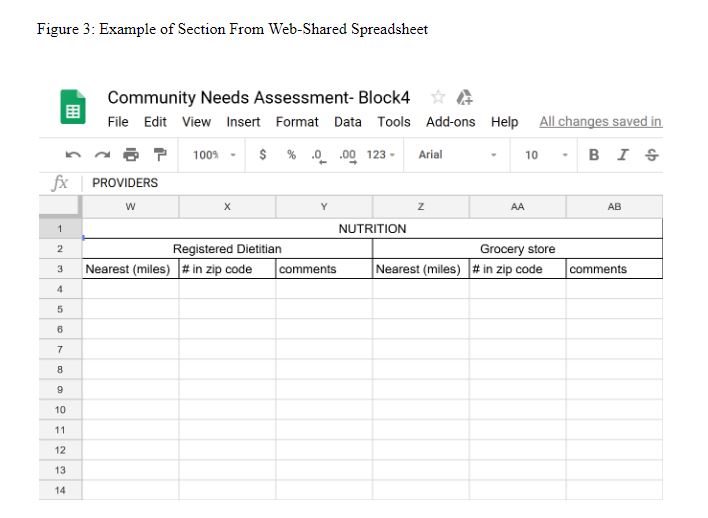
Additional columns not pictured above: Community resources, Schools, Public transportation, Health care delivery locations, Hospital, Health department, Pharmacy, Physical activity, Gym, Green space, Health care providers, Primary care physician (other than clinical site), Endocrinologist, Cardiologist, Ophthalmologist, and Dentist.
Over the course of the FMC, students complete the remainder of the spreadsheet, which includes information about various health-related resources including specialty care, nutrition, physical activity, health care delivery, and community infrastructure. For each item, they identify the nearest resource in miles from the practice, and the number of resources offered within their zip code. While some information can be gathered from an internet search, students are encouraged to dig deeper. Students have gathered such information as provider insurance acceptance, facility fees, and safety of community resource locations. Students are specifically instructed to visit the nearest grocery store and green space, and to take public transportation to work at least one day of their rotation.
Halfway through the rotation, small groups of students convene via a web-based platform (WebEx) for faculty-led discussion sessions. These sessions include discussion of two cases: the first is the one presented in the initial lecture and the second is a case of an obese
female trying to lose weight (Figure 2). The students are asked to reflect on the findings of their community needs assessment as they pertain to each case. For example, if they found gyms or grocery stores to be scarce that might make adherence to diabetic guidelines or weight loss challenging. Finally, at the end of the FMC students convene on campus for a final faculty-led feedback session. The same survey given at the beginning of the clerkship is again administered.
Preliminary feedback has shown significant student participation and engagement with the subject field. Student reflections have demonstrated growth in comprehension and integration of public health concepts. Further modifications will be made in response to student feedback and survey data.
References
- Institute of Medicine Committee on Integrating Primary Care and Public Health. Primary care and public health: exploring integration to improve population health. Washington, DC: National Academy of Sciences; 2012.
- Campos-Outcalt D. Public health and family medicine: an opportunity. J Am Board Fam Pract. 2004;17(3):207-211.
- Prunuske J, Chang L, Mishori R, Dobbie A, Morley CP. The extent and methods of public health instruction in family medicine clerkships. Fam Med. 2014;46(7):544-548.